
Computer Network Security Threats in 2026
Your computer connects to dozens of networks each day. Wi-Fi at home, public hotspots at coffee shops, mobile tethering when you travel, and even Bluetooth connections to headphones or printers. Each connection opens a pathway that attackers can exploit. Understanding computer network security threats helps you spot suspicious activity before it causes damage, whether you run a small business, work from home, or simply want to keep your family's data safe.
Why network threats target everyday users
Many people assume hackers only target large corporations or government agencies. The reality differs sharply. Cybercriminals increasingly focus on home users and small businesses because they often lack dedicated IT staff and may not recognize warning signs until it's too late.
Attackers exploit common behaviours:
- Trusting familiar-looking login pages without checking the URL
- Connecting to public Wi-Fi without encryption
- Clicking email attachments from seemingly legitimate senders
- Ignoring software updates that patch known vulnerabilities
The ENISA Threat Landscape 2025 report confirms that phishing, ransomware, and supply chain attacks continue to affect users across all sectors. Small businesses face particular risk because attackers know they hold valuable data but often operate with limited security budgets.

Ransomware and behaviour-based attacks
Ransomware remains one of the most disruptive computer network security threats you can face. Attackers encrypt your files and demand payment for the decryption key. Modern ransomware variants spread through network connections, moving from one PC to another within minutes.
How ransomware enters your network
Common infection vectors include:
- Phishing emails with malicious attachments disguised as invoices or delivery notifications
- Drive-by downloads from compromised websites that exploit browser vulnerabilities
- Remote Desktop Protocol (RDP) attacks when weak passwords protect network access
- USB devices carrying infected files that auto-run when plugged in
The CrowdStrike 2026 Global Threat Report documents how ransomware operators now combine encryption with data theft, threatening to publish sensitive information if victims don't pay. This double-extortion tactic works particularly well against small businesses that can't afford reputational damage.
Behaviour monitoring offers a practical defense layer. Instead of relying solely on signature databases that recognize known malware, behaviour monitoring watches for suspicious patterns. When a program suddenly starts encrypting hundreds of files or making unusual network connections, the system can block it before serious damage occurs.
| Ransomware Defense Layer | What It Does | Why It Matters |
|---|---|---|
| Email filtering | Blocks known malicious attachments | Stops threats before they reach your inbox |
| Behaviour monitoring | Detects unusual file encryption activity | Catches new ransomware variants immediately |
| Network segmentation | Limits lateral movement between devices | Prevents one infected PC from spreading to others |
| Regular backups | Maintains clean copies of your data | Lets you restore without paying ransom |
Phishing and social engineering tactics
Phishing attacks manipulate you into revealing passwords, financial details, or other sensitive information. These computer network security threats succeed because they exploit human psychology rather than technical vulnerabilities.
Modern phishing campaigns have become remarkably sophisticated. Attackers research their targets through social media, craft convincing email designs that mirror legitimate companies, and create urgency that bypasses your normal caution.
Warning signs to watch for:
- Unexpected requests to verify account details or reset passwords
- Slight misspellings in sender domains (like "amaz0n.com" instead of "amazon.com")
- Generic greetings ("Dear Customer") instead of your actual name
- Threats of account closure or legal action if you don't act immediately
- Links that display one URL when you hover but lead somewhere else when clicked
The MITRE ATT&CK Enterprise Matrix catalogs how adversaries use techniques like credential phishing (T1566) across the initial access, persistence, and credential access stages of an attack. Understanding these patterns helps you recognize when something feels wrong.
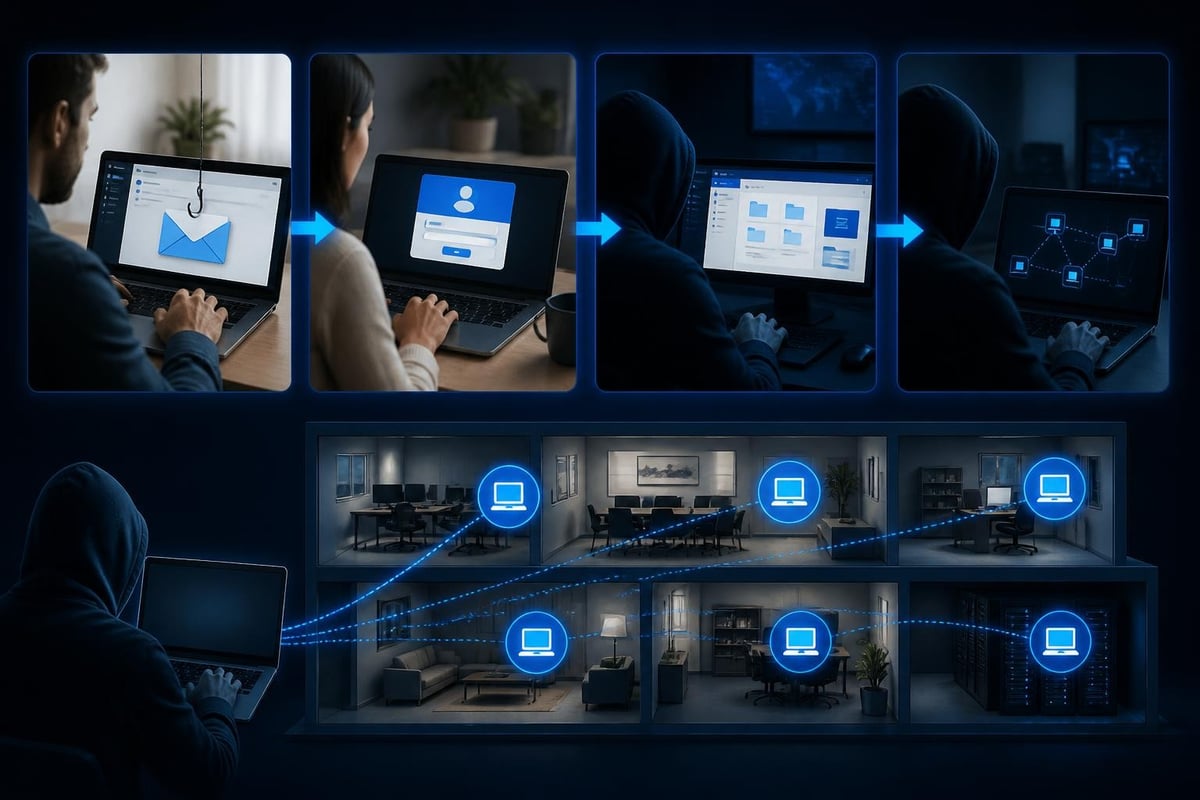
Small businesses face targeted spear-phishing that references real projects, colleagues, or vendors. An email might appear to come from your accountant requesting updated bank details, or from a supplier sending an "updated invoice" that actually contains malware. Always verify unexpected requests through a separate communication channel before taking action.
DDoS attacks and network availability
Distributed Denial of Service (DDoS) attacks flood your network with traffic until legitimate users can't connect. While massive DDoS attacks against major websites make headlines, smaller-scale attacks can still disrupt home offices and small business operations.
Types of DDoS attacks
Volumetric attacks overwhelm your internet connection with massive amounts of data. Your router or modem simply can't process the flood, cutting off your access to email, cloud storage, and other online services.
Protocol attacks exploit weaknesses in network protocols to consume server resources. SYN floods, for example, start connection requests without completing them, exhausting your network's ability to handle legitimate connections.
Application layer attacks target specific web applications or services. These attacks can be smaller in volume but effectively knock services offline by overwhelming the application logic.
The Cloudflare Radar 2025 Year in Review shows DDoS attacks continue to grow in frequency and size. While home users rarely face direct DDoS attacks, small businesses with public-facing websites or services must consider this risk.
Most DDoS protection happens at the network perimeter through your internet service provider or web hosting company. However, understanding these computer network security threats helps you recognize when unusual network slowdowns might indicate an attack rather than routine congestion.
Unauthorized access and lateral movement
Once attackers gain initial access to your network, they rarely stop at one device. Lateral movement describes how threats spread from the compromised entry point to other PCs, servers, and network resources.
Common lateral movement techniques:
- Credential theft: Extracting saved passwords or capturing keystrokes to access other systems
- Exploiting trust relationships: Moving between devices that share authentication or network file access
- Remote administration tools: Using legitimate management software in unauthorized ways
- Network scanning: Mapping your network to identify valuable targets
The CISA Known Exploited Vulnerabilities Catalog tracks vulnerabilities that attackers actively exploit to gain and expand network access. Regular patching addresses these known weaknesses before they become entry points.
Windows networks present particular challenges because users often share files, printers, and resources. A single compromised PC can provide access to shared folders containing sensitive business documents or customer data. Network monitoring helps detect unusual connection patterns that suggest lateral movement in progress.
Detecting suspicious network behavior
You don't need enterprise security tools to spot many network threats. Watch for these indicators:
- Programs connecting to unfamiliar internet addresses, especially in countries where you don't do business
- Network activity during hours when you're not actively using your PC
- Unexpected file transfers or data uploads
- New devices appearing on your network that you didn't authorize
- Changes to your network configuration or security settings that you didn't make
Clear, understandable alerts help you act on threats without needing technical expertise. When your security software reports "suspicious outbound connection to an IP address associated with malware distribution," you can block it immediately rather than puzzling over cryptic error codes.
Man-in-the-middle attacks on unsecured networks
Public Wi-Fi networks at hotels, airports, and cafes create opportunities for man-in-the-middle (MITM) attacks. Attackers position themselves between your PC and the internet, intercepting data as it passes through.
How MITM attacks work
When you connect to public Wi-Fi, your traffic flows through the access point to reach the internet. An attacker on the same network can use readily available tools to capture this traffic. Without encryption, they can read emails, view login credentials, and monitor your browsing activity.
Evil twin attacks take this further by creating fake Wi-Fi networks with names similar to legitimate ones. "Starbucks_WiFi" and "Starbucks-WiFi" might both appear in your available networks list, but only one connects to the actual cafe network. The fake access point captures all your traffic directly.
SSL stripping attacks intercept secure HTTPS connections and downgrade them to unencrypted HTTP. You might think you're on a secure banking website, but the attacker has removed the encryption while maintaining the connection to the real site.
Traveling for work or leisure makes you particularly vulnerable to these computer network security threats. You connect to unfamiliar networks frequently and may not notice subtle signs of interception. A VPN encrypts all your traffic before it leaves your PC, preventing attackers from reading intercepted data even if they capture it.
Malicious USB and Bluetooth threats
Network security isn't limited to Wi-Fi and ethernet cables. USB ports and Bluetooth connections create additional pathways that attackers exploit.
USB-based attacks
BadUSB attacks reprogram USB device firmware to mimic keyboards, network adapters, or other devices. When you plug in what appears to be a simple USB drive, it might immediately start executing commands on your PC, installing malware or changing security settings.
Juice jacking targets public USB charging stations. Modified charging ports can copy data from your phone or install malware while you charge. Use your own power adapter rather than connecting directly to public USB ports.
Found USB drives represent a classic social engineering attack. People naturally want to see what's on a drive they find, but plugging it in might auto-run malware or exploit vulnerabilities in how Windows handles removable media.
Bluetooth vulnerabilities
Bluetooth connections typically have limited range, but that doesn't make them safe. BlueBorne attacks exploit Bluetooth implementation flaws to spread malware without any user interaction. Your device doesn't even need to be paired with the attacker's device.
Bluetooth eavesdropping can capture data transmitted over poorly secured Bluetooth connections. Keyboards, mice, and headsets sometimes use weak encryption that attackers can break to monitor your activity.
The Cisco Talos Year in Review regularly reports on new vulnerabilities in IoT and wireless protocols. Keeping Bluetooth disabled when you're not actively using it reduces your exposure to these threats.
| Connection Type | Common Threats | Practical Protection |
|---|---|---|
| Wi-Fi | MITM attacks, evil twins, traffic interception | Use VPN on public networks, verify network names, prefer mobile data for sensitive transactions |
| USB | Malware auto-run, BadUSB attacks, data theft | Disable auto-run, scan before opening files, don't use found drives |
| Bluetooth | BlueBorne malware, eavesdropping, unauthorized pairing | Disable when not needed, don't accept unknown pairing requests, keep devices updated |

Zero trust and modern network security
Traditional network security assumed everything inside your network perimeter could be trusted. Firewalls kept threats outside while internal traffic moved freely. This model fails against modern computer network security threats that start inside your network through phishing or compromised devices.
Zero Trust Architecture reverses this assumption. Trust nothing by default, whether it's inside or outside your network. Every connection requires verification, and access is limited to only what's necessary for the specific task.
Zero Trust principles for small networks:
- Verify every device and user before granting network access
- Assume breach: monitor all network activity for signs of compromise
- Limit lateral movement by segmenting your network and restricting connections between devices
- Apply least privilege: users and programs only access the specific resources they need
You can apply Zero Trust thinking without enterprise infrastructure. Separate your guest Wi-Fi from your main network so visitors can't access your business files. Require strong passwords for all network resources, even internal file shares. Monitor outbound connections to catch malware trying to communicate with command servers.
The SANS Institute white paper on applying Zero Trust provides practical guidance for implementing these controls in real environments. Small businesses benefit from these principles because they reduce the impact when a single device becomes compromised.
Practical threat detection and response
Understanding computer network security threats matters most when it translates into action. You need to detect suspicious activity and respond effectively before minor incidents become major breaches.
Building detection capabilities
Network monitoring watches the connections your PCs make, flagging unusual destinations, protocols, or data volumes. When a program suddenly contacts a server in an unexpected country or transfers gigabytes of data at 3 AM, you want to know immediately.
Threat intelligence compares network activity against known malicious addresses, domains, and patterns. This helps you identify when a connection targets a command-and-control server used by ransomware operators or a phishing site harvesting credentials.
Behavioral analysis learns your normal network patterns. Your accounting software might legitimately connect to cloud services during business hours, but the same behavior at midnight could indicate compromise. Reducing false alarms requires understanding what's normal for your specific environment.
Responding to detected threats
When you receive an alert about suspicious network activity, you need clear options:
- Block the connection immediately to stop potential data theft or command execution
- Investigate the source to determine which program or process initiated the connection
- Isolate the device from your network if it appears compromised, preventing spread to other PCs
- Document the incident including what you observed and what actions you took
NetGuardian Pro addresses these needs by monitoring network connections across Wi-Fi, USB, and Bluetooth on Windows 11 PCs. Its 14 detection modules watch for the specific computer network security threats affecting home users and small businesses, providing clear alerts you can understand and act on without IT expertise.
Protecting cloud and hybrid networks
Cloud services change how you think about network security. Your data doesn't just sit on PCs in your office. It lives in cloud storage, travels through collaboration platforms, and gets accessed from multiple devices across different networks.
Cloud-specific threats
Misconfigured access controls accidentally expose sensitive data. A cloud storage bucket meant for your team might become publicly readable if settings aren't configured correctly.
Compromised credentials give attackers access to your cloud accounts. Once inside, they can download data, modify settings, or use your cloud resources for cryptocurrency mining.
API vulnerabilities affect how cloud services communicate. The OWASP API Security Top 10 documents common weaknesses that attackers exploit to bypass authentication or access data they shouldn't see.
Google Cloud Security Best Practices emphasizes that cloud security is a shared responsibility. Your cloud provider secures the infrastructure, but you're responsible for protecting your data, managing access, and monitoring for threats.
Securing hybrid work
Remote work means your network extends beyond your physical office. Employees connect from home networks, coffee shops, and hotel rooms. Each connection point introduces computer network security threats you need to address.
Strong authentication prevents unauthorized access even if passwords leak. Two-factor authentication adds a second verification step that attackers can't easily bypass.
Encrypted connections protect data in transit. VPNs create secure tunnels through untrusted networks, keeping your traffic private even on public Wi-Fi.
Endpoint protection monitors the individual PCs connecting to your network, catching threats before they spread. This becomes essential when you can't control the entire network path like you could in a traditional office.
Continuous protection and adaptation
Computer network security threats evolve constantly. New vulnerabilities emerge, attackers develop new techniques, and your network grows to include new devices and services. Protection requires ongoing attention rather than one-time setup.
Staying current with patches
Software updates aren't just about new features. Security patches fix vulnerabilities that attackers actively exploit. The CISA Known Exploited Vulnerabilities catalog shows that many breaches use known flaws that victims simply hadn't patched yet.
Prioritize security updates for:
- Operating systems (Windows, macOS, Linux)
- Web browsers that you use daily
- Network equipment (routers, access points)
- Applications that handle sensitive data or connect to the internet
Automatic updates help, but verify they're actually running. Occasionally check that your Windows PC is current and that no updates failed to install.
Learning from incidents
Each security incident teaches you something about your vulnerabilities and threat landscape. Document what happened, how you detected it, and how you responded. These lessons improve your security posture over time.
Share knowledge with others in your industry. Small businesses in similar sectors often face the same computer network security threats. Learning from each other's experiences helps everyone improve their defenses.
Understanding computer network security threats helps you protect what matters: your business data, customer information, and family privacy. Modern threats target the network connections you rely on every day, but clear visibility into suspicious activity lets you respond before damage occurs. NetGuardian Pro monitors Wi-Fi, USB, and Bluetooth connections on your Windows 11 PC, providing the network-level protection that complements your antivirus software with clear alerts and practical blocking controls. Take control of your network security today.
Related reading: Best Rated Computer Security Solutions for 2026, Network Attacks: How to Detect and Stop Threats in 2026, Computer Network Attack: What It Is and How to Stay Safe.