Hawk Kids lets you manage your child’s cell phone from your phone or PC: Apps. Games. Chats. Wifi.
A parental control app for your child’s Android cell phone or tablet, with screen time limits, GPS location, app blocking and website blocking, run from the Hawk Kids app on your own mobile phone.
Block and unblock the device directly, on home WiFi or mobile data, for bedtime, homework or dinner, block or limit single apps such as TikTok or YouTube, and block websites you choose. Looking for a Family Link alternative? Hawk Kids is a once-off payment with no subscription.
NEW: Block websites. Switch on adult content, gambling or VPN sites, or add any address. A blocked site will not open in any browser or app on your child’s phone.
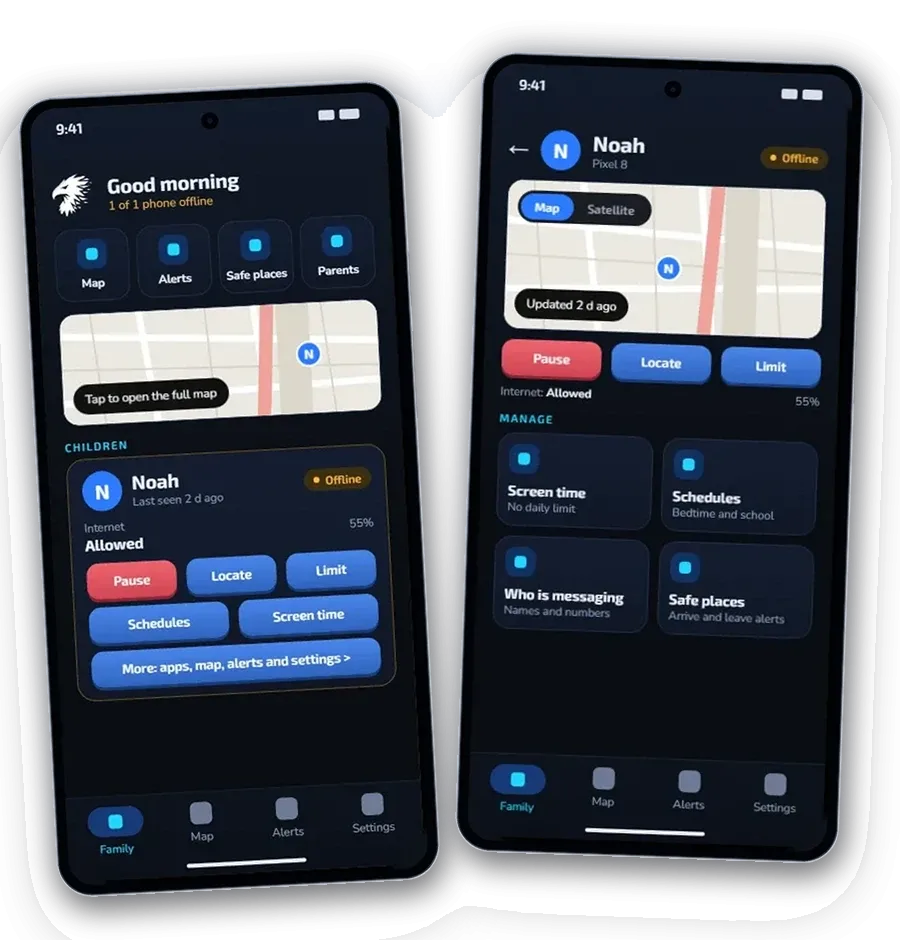
Install the small app on your child’s phone, enter the pairing code from your phone, and mom or dad can pause it in one tap and see on a map where your child is.
Now with a Windows program included. Your licence also covers Hawk Kids for PC, so you can see the map, alerts, schedules, screen time and apps from your own Windows 10 or 11 computer, with the same login as the phone app. No extra cost.
Somewhere tonight, a child is chatting with a stranger who is pretending to be a friend. We are committed to protecting the children of the world against every predator, one family at a time.




Somewhere tonight, a stranger is pretending to be a child's friend.
Hawk Kids sits quietly on your child's Android phone and reports to a Windows program on your computer. You see where they are, set the limits, and get a warning when a chat looks risky. One license covers your family.
No subscription. 7-day refund.
Parent on iPhone, child on Android? Use the parent web portal in Safari. Same controls as the app.›Or on a laptop or PC? Install the free Windows 10 & 11 program. Included at no extra cost.We are committed to protecting the children of the world against every predator, one family at a time.


Family locator app
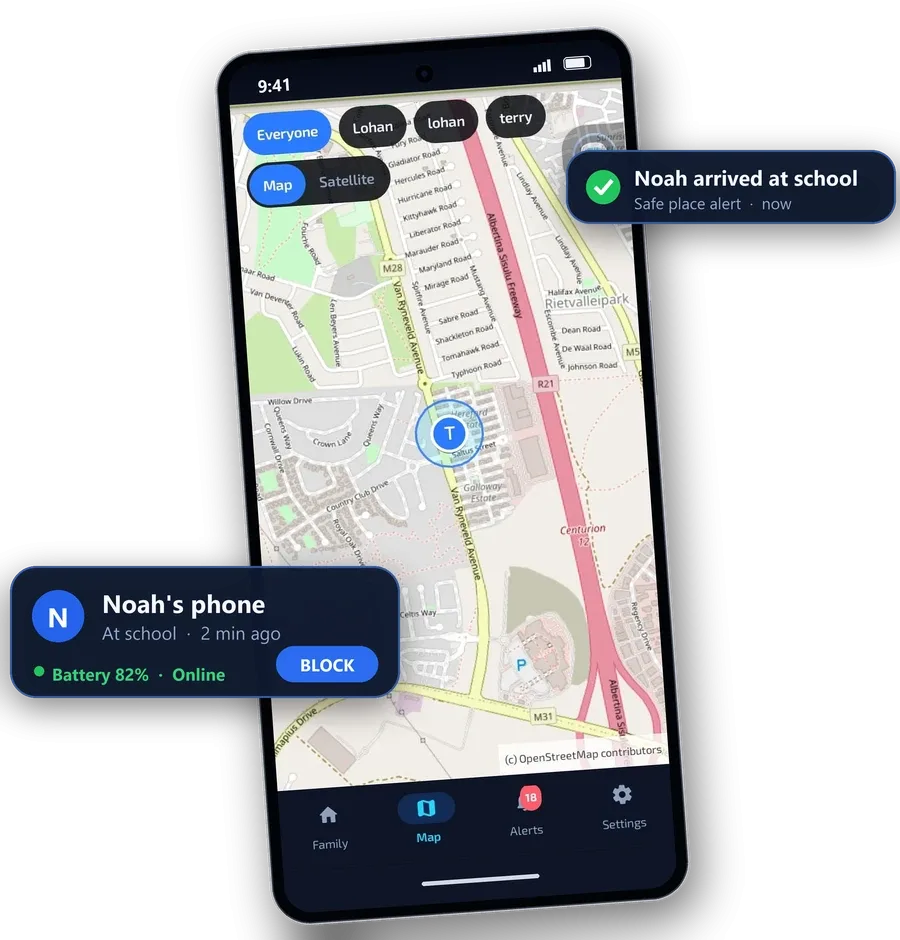
The Hawk Kids app shares your child’s mobile phone or Android tablet GPS location with you. Open the app and see a pin on the map, when it last updated and how much battery is left.
Get an alert when they arrive at or leave school, home or a friend’s place.
Then block the phone in one click if you need to.
Your child approves location sharing on the phone, and Android shows a notice while it is on.
Hawk Kids app for parents
Install the Hawk Kids app on your own Android mobile phone and manage your child’s cell phone or Android tablet from anywhere.
See where they are. Every child on one map, with the time of the last update and the battery level.
Block and unblock in one tap. Pause a phone for dinner or homework and bring it back just as fast.
Schedules that run themselves. Bedtime, school hours and homework time, set once and applied every day.
Apps under control. Block an app or give it a daily time limit, and see how long each one was used. Websites you choose. Block adult content, gambling and VPN sites, or any address you add.
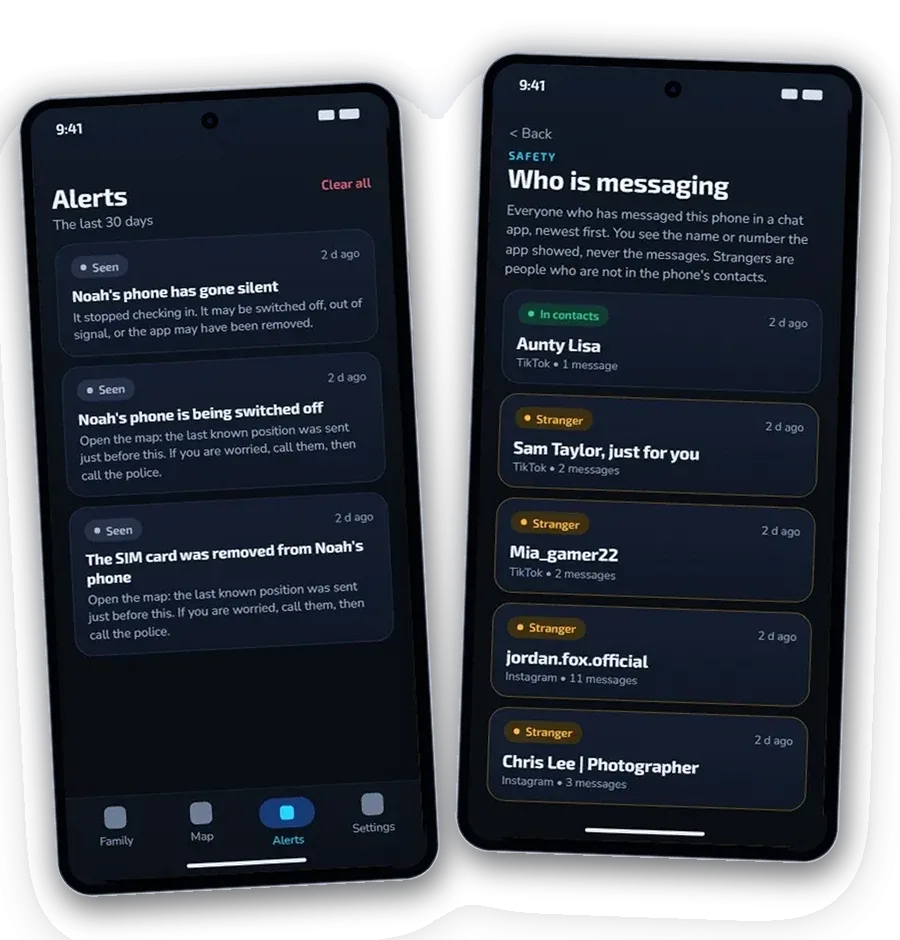
Alerts that matter. Know when your child arrives at or leaves school or home, when the battery is low, or when the phone goes quiet.
Mom and dad both in the loop. Each parent signs in with their own login and sees the same family.
Your child’s phone shows a notice when location sharing is on.
App controls
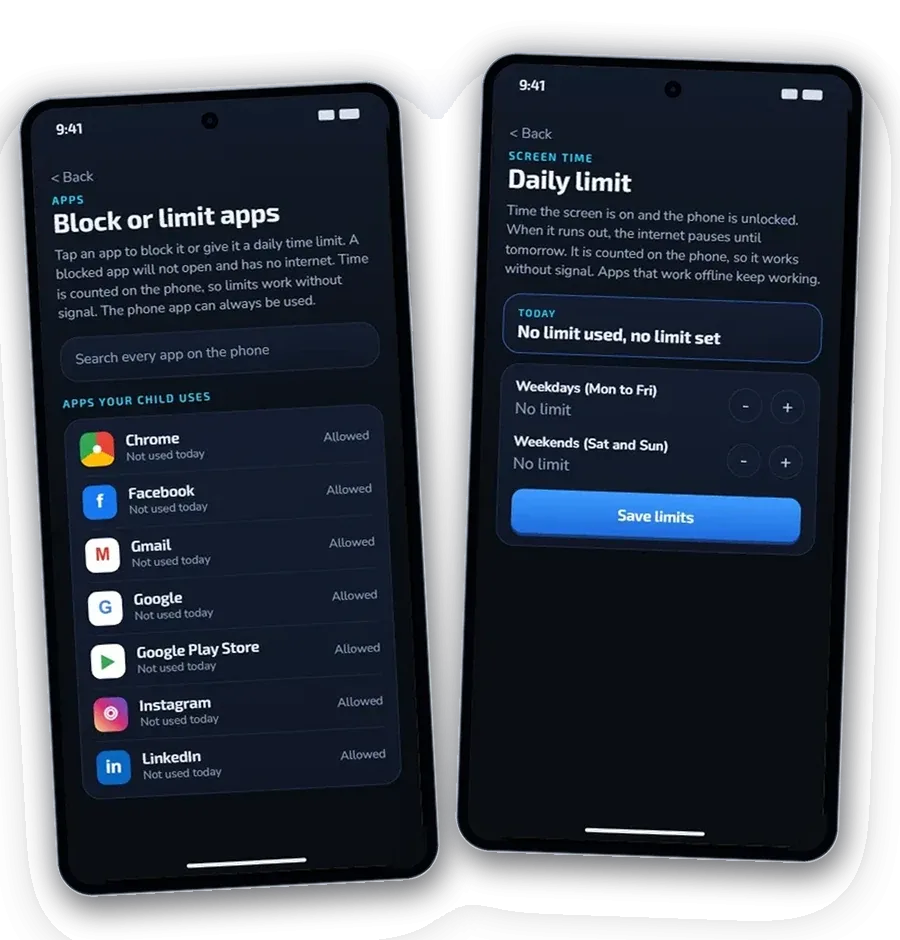
Choose any app on your child’s phone. Block it, or set a daily time limit for it. It works even with no signal.
Block an app. It won’t open and it has no internet. Switch it back on whenever you like.
Set a daily limit. Your child gets a warning with 5 minutes left, then the app closes until tomorrow.
See time per app. Check how long each app was used today, on your phone or on your Windows PC.
The app asks for one extra permission on your child’s phone and shows you where to switch it on. The phone app is never blocked, so your child can always call for help. Hawk blocks apps, pauses the internet and blocks the websites you choose.
Each bar is one day, 6 am to 10 pm. You set the rules, Hawk keeps them.
NEW: Website blocking
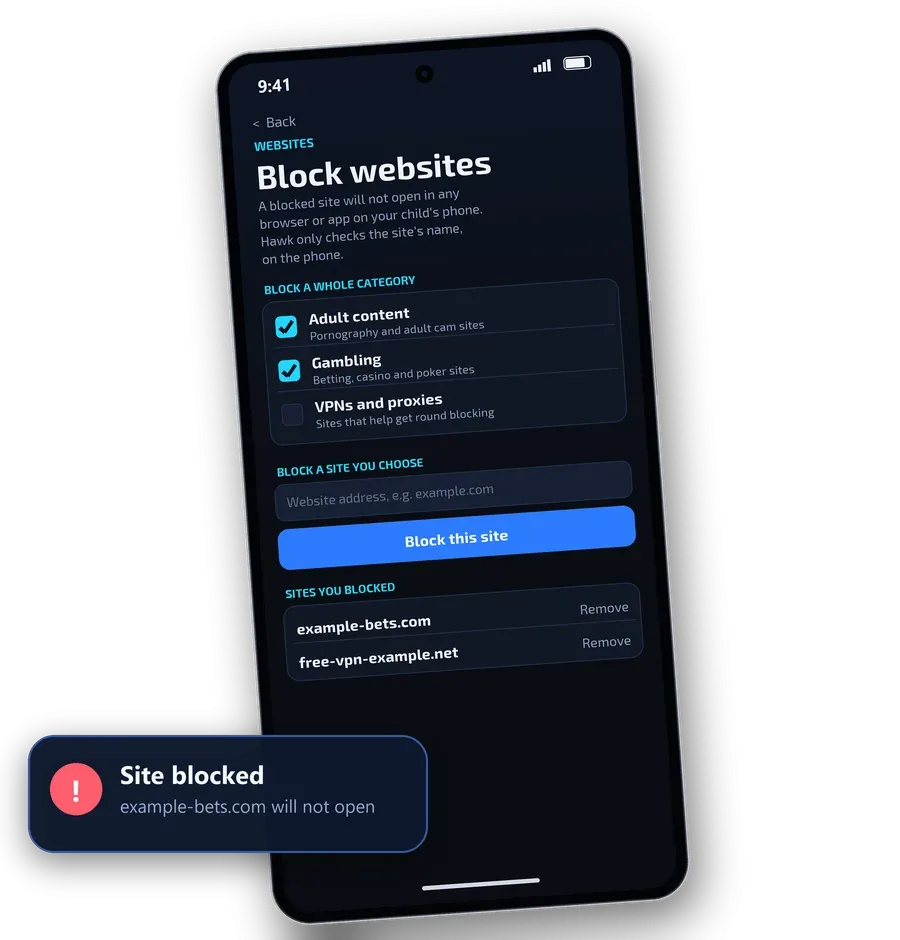
Switch on adult content, gambling or VPN sites, or add any address. A blocked site will not open in any browser or app on your child’s phone.
Pick a category. Adult content, gambling, or VPNs and proxies, switched on with one tap.
Add any site. Type the address of any website you want blocked.
Private by design. Hawk only checks a site’s name against your list, on the phone. It does not record or send what your child visits.
Your child’s phone needs Hawk’s VPN permission, the same one the Pause button uses. The category lists cover well-known sites, not every site on the internet. A child who changes the phone’s Private DNS setting or uses a VPN of their own can get round website blocking.
Protect kids from online predators
Children are targeted through chat apps and games every day. Hawk is a parental monitoring app that watches for the warning signs on your child’s Android cell phone and tells you early, so you can step in before it becomes a crisis.
Risky phrases are flagged. Requests for pictures, demands for money and “don’t tell your parents” are the classic signs of grooming and sextortion.
Unknown contacts are reported. You are told when a new stranger starts messaging your child.
Private chats stay private. We do not show you their messages. Your child’s phone shows a notice that safety alerts are on, so it builds trust instead of secrecy.
Alerts help you start the conversation. They do not replace it.
Guidance from the National Center for Missing & Exploited Children and its CyberTipline. If a child is in immediate danger, call your local emergency number.
Hawk Parental Control for Windows
Prefer a big screen? The Windows program is included in the price of Hawk Kids for Android, at no extra cost. Hawk Parental Control for Windows shows every child’s cell phone or mobile phone in one place. See who is online, block the internet with one click, add 15 minutes of screen time, or tap Locate now to see them on a live map. Safe places and alerts live there too, and an alert pops up on your desktop the moment something needs you. Works on Windows 10 and 11.

![]()
![]()

Yours for life. No monthly or yearly fees and no auto-renewals, unlike many other apps.
For any member of your family, not just kids. Up to 3 children and 4 parents. 7-day refund.
Buy Hawk - R999* Prefer to pay in USD? Easily switch your payment currency when landing on the Payfast facilitated payments page.
What's included, for one payment:
Available in 29 languages
Hawk Kids is available in 29 languages, in the app and on Google Play. Google Play translates it for you, so you see the version that matches your phone language. Translations are machine generated.
Questions before you buy


See where your children are, pause their phone in one tap and get warned about danger early. One payment, no subscription.


Straight answers to the questions parents ask us most, from the person who builds Hawk Kids.